Services
Sell work, expertise and activities alongside your physical products — services live in your catalogue, your price lists and your customers' carts just like products do.
services-listView the list of services.services-showView the details of a service.services-storeCreate services.services-updateEdit services.services-archiveArchive and restore services.services-deletePermanently delete services.services-csv-importImport services from a CSV file.
Overview
Services are non-physical offerings: work, expertise or activities that you provide to stores and their buyers. Unlike a product, a service has no stock, but it is created, priced, approved and ordered through the same tools. Buyers add services to their carts next to products, and services appear in your order logs, reports and quotations in the same way.
This page explains how services are modelled and the ways you can manage them. The detailed step-by-step guides are:
- Manage Services with Files — import new services, update existing ones and delete services with CSV files, including the required and optional field reference.
- Create and Attach Forms to Services — build forms that customers complete when they buy a service, with support for text, date, select, file upload and signature fields, and form logic for dynamic pricing.
- Managing Service Price Lists — create and import service prices across your connected stores and countries.
- SFTP Service Uploads — automate service and price uploads from your own systems.
Service types
The platform supports two types of service:
| Type | How it works | Unit |
|---|---|---|
| Fixed | A set price for a set scope, typically a one-off piece of work. The quantity is normally not specified. | Uses AU (arbitrary unit) as its unit label. |
| Variable | The price depends on a measured quantity such as time or effort, so the buyer chooses how much of the service to order. | Uses a unit size and label you define, such as 1 hour or 1 day. |
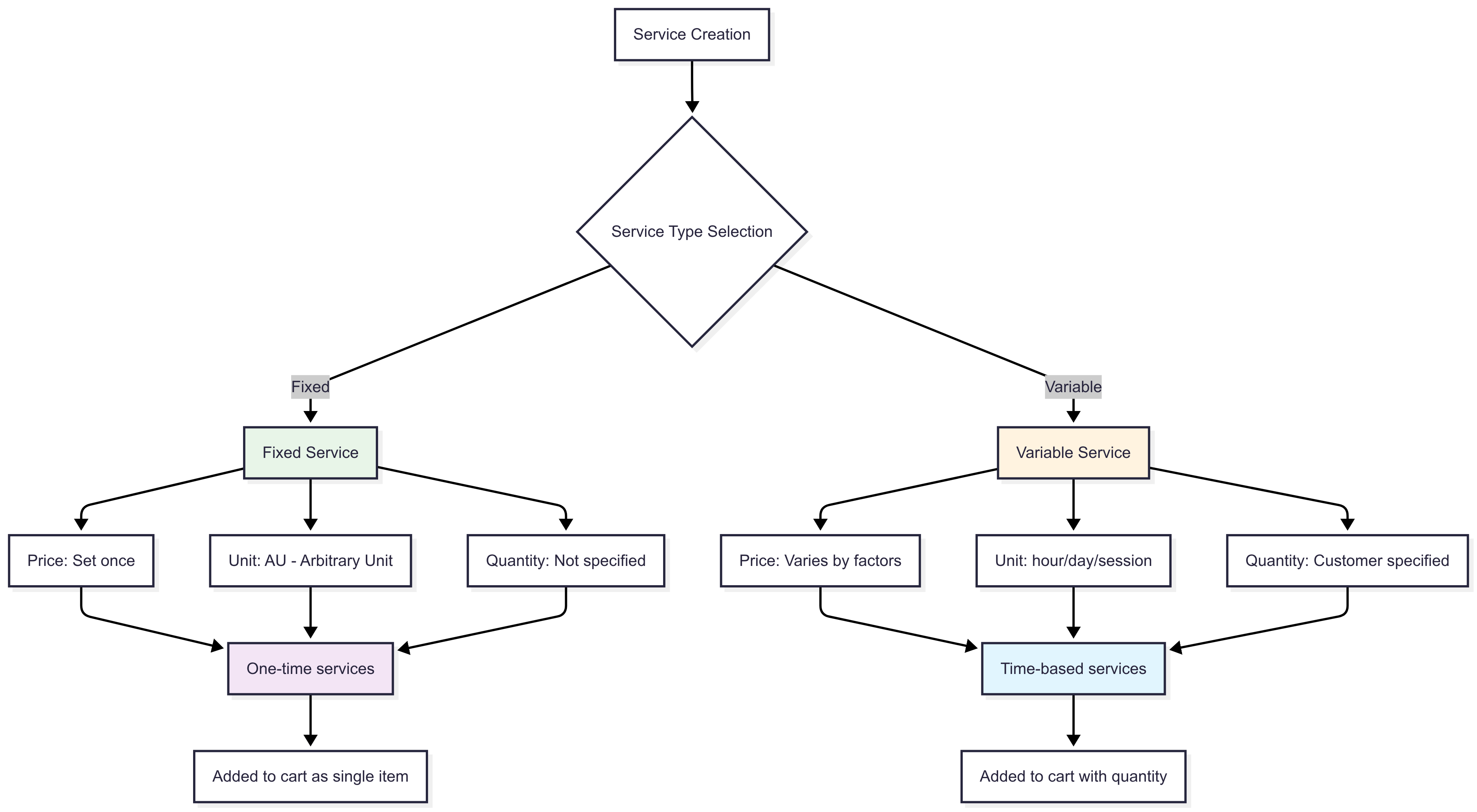
What a service is made of
Core fields
| Field | Required | Description |
|---|---|---|
| Identifier | Yes | Your unique identifier for the service within your catalogue. |
| Type | Yes | fixed or variable. |
| Name | Yes | The name shown to customers. |
| Unit size and Unit label | Yes | The quantity and unit a single order line represents. Fixed services use AU. |
| SKU | Yes | Your stock keeping unit for the service. |
| UNSPSC code and version | Yes | The classification code buyers use to find the service. |
| Description | No | A detailed description of what the service includes. |
| URL | No | A link to more information about the service on your own site. |
| Group identifier | No | Groups related services together. |
| Form | No | The form customers complete when ordering. See forms below. |
Properties
Properties are key-value pairs that describe the service, such as Duration: 2 hours. They are searchable and filterable by buyers, can be translated into each of your supported languages, and can be updated at any time.
Media
A service can carry image URLs that showcase the offering and document URLs for brochures, specifications or terms.
Codes
Alongside the SKU and UNSPSC code, a service can hold any other codes you need for identification or integration with your own systems.
Forms
A form collects information from the customer at the point of ordering, such as a site address, a preferred date or a signature. Forms are built with the form builder, support several field types, and can be marked as required for a service. Form logic can also drive dynamic pricing. See Create and Attach Forms to Services.
Pricing
Service prices work like product prices. A price can be set per store and per currency, may need approval from the store operator before it is visible, and can be managed in bulk through price lists. See Managing Service Price Lists.
Creating and updating services
You can create and update services in three ways:
- In the web interface — create or edit a service individually from the Services page.
- By CSV import — create or update many services at once. See Manage Services with Files for the file layout.
- By automated upload — drop files on your SFTP account and let the platform import them. See SFTP Service Uploads.
Bulk imports run in the background, and you can follow their progress and download any error report from the imports list. See Check Status of Uploaded Items.
Validation
Every service, whether created on screen or imported, has to pass the same checks:
- All required fields are present.
- The identifier is unique within your catalogue.
- Any URLs are valid.
- Property keys are text.
- The type is
fixedorvariable.
Rows that fail validation are reported in the import's error file and are not created.
Archiving and deleting services
- Archive a service to take it off sale while keeping its data. Archived services can be restored later.
- Delete a service to remove it permanently.
Both actions are available per service in the web interface and in bulk through a CSV import.
How services are ordered
Services follow the same path as products from listing to order:
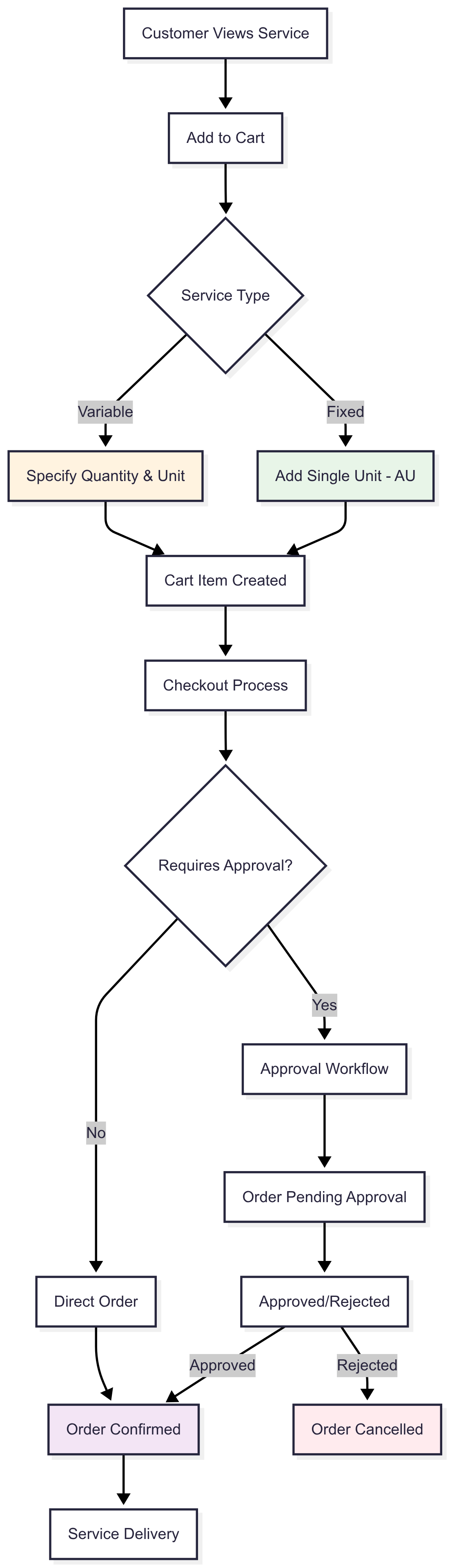
- Buyers find services through search and add them to a cart alongside products.
- If the service has a form, the buyer completes it in the cart.
- Services go through the store's approval and quotation workflows in the same way as products.
- Ordered services appear in your order logs, reports and exports.
Tips & good practice
- Pick the type carefully. A fixed service cannot be re-quantified by the buyer. If the effort varies per job, make it variable and choose a unit the buyer understands.
- Use forms for anything you need to know before you start. Site details, dates and approvals collected at order time save a follow-up message per order.
- Import, don't retype. Once you have more than a handful of services, maintain them in a spreadsheet and import the CSV. The same file can create and update services.
- Classify accurately. The UNSPSC code decides which buyers see the service and which approval rules apply to it.
Troubleshooting
My CSV import created no services.
Open the import's error file. The most common causes are a missing required field, a duplicate identifier, or a type that is not exactly fixed or variable.
A service is visible to me but not to buyers. Either its price is still waiting for approval by the store operator, or the service has no price in that store. Check the price status in Managing Service Price Lists.
I archived a service by mistake. Archived services are kept. Open the archived services list and restore it.
I can't see the Services page or the create button. Your role is missing one or more of the service permissions listed at the top of this page. Ask an admin on your team to grant them. See Supplier Roles & Permissions.
Need help?
If a service or import is not behaving as described here, contact support with the service identifier, the import ID if one is involved, and the store you are offering into.