Manage Products with Files
Bulk import, update, and delete products using CSV and JSONL files.
product-csv-importImport products from a CSV file.product-importImport products in bulk (JSONL/API).product-batch-uploadUpload product files for batch processing.product-batch-operationRun bulk product operations from an uploaded file.supplier-batch-request-listView the list of import requests.supplier-batch-request-showView the details of an import request.supplier-batch-request-download-listDownload the results of an import request.supplier-batch-request-download-error-listDownload the errors from an import request.
Overview
Products are the primary catalogue entity in the marketplace platform. You can upload products using files.
CSV Files
CSV files are supported for importing products. Any text editor or spreadsheet application can read them, and they do not contain code.
JSON Lines (JSONL) Files
JSONL files are supported for importing products. They handle tabular data cleanly and without ambiguity. JSONL files are useful for larger datasets because the data can be streamed rather than fully loaded into memory. Each line of the JSONL file is a JSON object that represents a product, held within a pair of curly brackets. The following example contains three products:
{"type": "complex", "name": "GFP ELISA Kit, Cell Biolabs", "brand": "Cell Biolabs", "prices": [{"price": "775.38", "country": "GB", "currency": "USD"}], "unit_size": "Each", "categories": ["Home", "Assays", "ELISAs"], "image_urls": ["https://us.vwr.com/stibo/bigweb/std.lang.all/72/62/17627262.jpg"], "product_identifier": "caueuqlvbzjnfknu", "properties": {"Sensitivity": "30 pg/mL", "Detection Method": "Colorimetric", "Storage Temperature": "4°C and –80°C", "Description": "GFP ELISA Kit", "Size": "96 Assays"}, "description": "<div class=\"textBodyText expander\" data-linkify=\"this\" data-linkify-target=\"_self\">\n<div class=\"textBodyText\">\nCell Biolabs’ GFP ELISA Kit is an enzyme immunoassay developed for detection and quantitation of GFP or GFP fusion protein in cell or tissue samples<br>\n</div>\n<br>\n<div class=\"textBodyText\">\nThe quantity of GFP or its variants (including BFP, CFP and YFP) in an unknown sample is determined by comparing its absorbance with that of a known recombinant GFP standard curve. The kit has detection sensitivity limit of 30 pg/mL GFP.<br>\n</div>\n</div>", "manufacturer": "Cell Biolabs", "document_urls": null, "product_page_url": "https://us.vwr.com/store/product/18011707/gfp-elisa-kit-cell-biolabs", "variants": [{"sku": "102963-622EA", "name": "GFP ELISA Kit, Cell Biolabs", "brand": "Cell Biolabs", "codes": [{"type": "EAN", "code": "vftpmvqktezavpml"}, {"type": "MPN", "code": "AKR-121"}, {"type": "UNSPSC", "code": "kissqvheabnjtqfl", "version": "17"}], "prices": [{"price": "775.38", "country": "GB", "currency": "USD"}], "unit_size": "Each", "unit_label": "EA", "options": [{"name": "size", "value": "Each"}], "image_urls": ["https://us.vwr.com/stibo/bigweb/std.lang.all/72/62/17627262.jpg"], "variant_identifier": "bahskfbjcvwpywck", "description": "<div class=\"textBodyText expander\" data-linkify=\"this\" data-linkify-target=\"_self\">\n<div class=\"textBodyText\">\nCell Biolabs’ GFP ELISA Kit is an enzyme immunoassay developed for detection and quantitation of GFP or GFP fusion protein in cell or tissue samples<br>\n</div>\n<br>\n<div class=\"textBodyText\">\nThe quantity of GFP or its variants (including BFP, CFP and YFP) in an unknown sample is determined by comparing its absorbance with that of a known recombinant GFP standard curve. The kit has detection sensitivity limit of 30 pg/mL GFP.<br>\n</div>\n</div>", "manufacturer": "Cell Biolabs", "document_urls": null, "product_page_url": "https://us.vwr.com/store/product/13411864/beeblottm-nbsp-automated-immunoblot-processor-gold-standard-diagnostic"}]}
{"type": "complex", "name": "EnzyChrom™ Neuraminidase Assay Kit, BioAssay Systems", "brand": "BioAssay Systems", "prices": [{"price": "620.02", "country": "GB", "currency": "USD"}], "unit_size": "Each", "categories": ["Home", "Assays", "Enzyme Assays"], "image_urls": ["https://us.vwr.com/stibo/bigweb/std.lang.all/60/95/21276095.jpg", "https://us.vwr.com/stibo/bigweb/std.lang.all/59/21/21275921.jpg", "https://us.vwr.com/stibo/bigweb/std.lang.all/60/96/21276096.jpg"], "product_identifier": "yavggimyypeidoeg", "properties": {"Method": "OD570 nm, or FL530/585 nm", "Processing Time": "60 minutes", "Sample": "Biological", "Description": "Neuraminidase Assay Kit", "Size": "100 assays"}, "description": "<div class=\"textBodyText expander\" data-linkify=\"this\" data-linkify-target=\"_self\">\n<div class=\"textBodyText\">\nFor quantitative determination of neuraminidase activity and screen for neuraminidase inhibitor.<br>\n</div>\n<br>\n<div class=\"textBulletPoint\">\n\n<div class=\"textBulletPoint\">\n<ul>\n<li>Linear detection range 0.1 to 10 U/L for colorimetric assays and 0.01 to 2 U/L for fluorimetric assays</li>\n<li>Can be readily automated to test thousands of samples per day</li>\n</ul>\n</div>\n</div>\n<br>\n<div class=\"textBodyText\">\nNeurominidase (also known as Sialidase) is an enzyme that hydrolyzes terminal sialic acid residues on poly-saccharide chains<br>\n</div>\n<br>\n<div class=\"textBodyText\">\nBioAssay Systems’ neuraminidase assay measures the sialic acid released by neuraminidase in one step. The change in color intensity of the reaction product at 570nm or fluorescence intensity at λex/em = 530/585nm is directly proportional to neuraminidase activity in the sample.<br>\n</div>\n<br>\n<div class=\"textBodyText\">\nIt is predominantly expressed in microorganisms such as bacteria and viruses. Cleavage of sialic acid residues by neuraminidase is believed to play several roles in infection by influenza viruses. It is thought to assist in the penetration of mucosal linings, the invasion of target cells, the elution of progeny viruses from infected cells, and the prevention of self-aggregation. Thus, neuraminidase is an important target for influenza drug development and simple, direct and automation-ready. Procedures for measuring neuraminidase activity find wide applications in research and drug discovery.<br>\n</div>\n</div>", "manufacturer": "BioAssay Systems", "document_urls": null, "product_page_url": "https://us.vwr.com/store/product/21315041/enzychromtm-neuraminidase-assay-kit-bioassay-systems", "variants": [{"sku": "75878-152EA", "name": "EnzyChrom™ Neuraminidase Assay Kit, BioAssay Systems", "brand": "BioAssay Systems", "codes": [{"type": "EAN", "code": "jehrqkxbpwkljewb"}, {"type": "MPN", "code": "ENEU-100"}, {"type": "UNSPSC", "code": "mpngijbjpnlqaofb", "version": "17"}], "prices": [{"price": "620.02", "country": "GB", "currency": "USD"}], "unit_size": "Each", "unit_label": "EA", "options": [{"name": "size", "value": "Each"}], "image_urls": ["https://us.vwr.com/stibo/bigweb/std.lang.all/60/95/21276095.jpg", "https://us.vwr.com/stibo/bigweb/std.lang.all/59/21/21275921.jpg", "https://us.vwr.com/stibo/bigweb/std.lang.all/60/96/21276096.jpg"], "variant_identifier": "luzbngzhblbmqfgw", "description": "<div class=\"textBodyText expander\" data-linkify=\"this\" data-linkify-target=\"_self\">\n<div class=\"textBodyText\">\nFor quantitative determination of neuraminidase activity and screen for neuraminidase inhibitor.<br>\n</div>\n<br>\n<div class=\"textBulletPoint\">\n\n<div class=\"textBulletPoint\">\n<ul>\n<li>Linear detection range 0.1 to 10 U/L for colorimetric assays and 0.01 to 2 U/L for fluorimetric assays</li>\n<li>Can be readily automated to test thousands of samples per day</li>\n</ul>\n</div>\n</div>\n<br>\n<div class=\"textBodyText\">\nNeurominidase (also known as Sialidase) is an enzyme that hydrolyzes terminal sialic acid residues on poly-saccharide chains<br>\n</div>\n<br>\n<div class=\"textBodyText\">\nBioAssay Systems’ neuraminidase assay measures the sialic acid released by neuraminidase in one step. The change in color intensity of the reaction product at 570nm or fluorescence intensity at λex/em = 530/585nm is directly proportional to neuraminidase activity in the sample.<br>\n</div>\n<br>\n<div class=\"textBodyText\">\nIt is predominantly expressed in microorganisms such as bacteria and viruses. Cleavage of sialic acid residues by neuraminidase is believed to play several roles in infection by influenza viruses. It is thought to assist in the penetration of mucosal linings, the invasion of target cells, the elution of progeny viruses from infected cells, and the prevention of self-aggregation. Thus, neuraminidase is an important target for influenza drug development and simple, direct and automation-ready. Procedures for measuring neuraminidase activity find wide applications in research and drug discovery.<br>\n</div>\n</div>", "manufacturer": "BioAssay Systems", "document_urls": null, "product_page_url": "https://us.vwr.com/store/product/13411864/beeblottm-nbsp-automated-immunoblot-processor-gold-standard-diagnostic"}]}
{"type": "complex", "name": "GLP-1 Total ELISA Assay Kit, Eagle Biosciences, Inc.", "brand": "Eagle Biosciences", "prices": [{"price": "850.00", "country": "GB", "currency": "USD"}], "unit_size": "Each", "categories": ["Home", "Assays", "ELISAs"], "image_urls": [], "product_identifier": "pslnzcuavddwgvci", "properties": {"Conjugate ELISA": "HRP", "Description": "GLP-1 Total ELISA Assay Kit", "Size": "1 kit"}, "description": "<div class=\"textBodyText expander\" data-linkify=\"this\" data-linkify-target=\"_self\">\n<div class=\"textBodyText\">\nGLP-1 Total ELISA determines sum of glucagon-like peptide-1 (7-36) & (9-36) in plasma.<br>\n</div>\n<br>\n<div class=\"textBulletPoint\">\n\n<div class=\"textBulletPoint\">\n<ul>\n<li>Dynamic Range: 2 -54 pmol/L</li>\n<li>Sensitivity: 0.6 pmol/L</li>\n<li>Incubation: overnight</li>\n</ul>\n</div>\n</div>\n<br>\n<div class=\"textBodyText\">\nThe primary amino acid sequence of GLP-1 peptide is identical among mammalian species, i.e. rat, mouse, pig, human, etc. The Eagle Biosciences GLP-1 Total ELISA Assay Kit (enzyme-linked immunoassay kit) is intended quantitative determination of sum value of glucagon-like peptide-1 (7-36) and (9-36) [GLP-1 (7-36)] and (9-36) [GLP-1 (9-36)] in plasma samples. Eagle Biosciences GLP-1 Total ELISA Assay Kit is for research use only and not to be used in diagnostic procedures.<br>\n</div>\n</div>", "manufacturer": "Eagle Biosciences", "document_urls": null, "product_page_url": "https://us.vwr.com/store/product/23210180/glp-1-total-elisa-assay-kit-eagle-biosciences-inc", "variants": [{"sku": "102994-424EA", "name": "GLP-1 Total ELISA Assay Kit, Eagle Biosciences, Inc.", "brand": "Eagle Biosciences", "codes": [{"type": "EAN", "code": "ygglkpyccdkjhfih"}, {"type": "MPN", "code": "GP131-K01"}, {"type": "UNSPSC", "code": "myfchiwrywkisfif", "version": "17"}], "prices": [{"price": "850.00", "country": "GB", "currency": "USD"}], "unit_size": "Each", "unit_label": "EA", "options": [{"name": "size", "value": "Each"}], "image_urls": [], "variant_identifier": "qmycncdmeoanscho", "description": "<div class=\"textBodyText expander\" data-linkify=\"this\" data-linkify-target=\"_self\">\n<div class=\"textBodyText\">\nGLP-1 Total ELISA determines sum of glucagon-like peptide-1 (7-36) & (9-36) in plasma.<br>\n</div>\n<br>\n<div class=\"textBulletPoint\">\n\n<div class=\"textBulletPoint\">\n<ul>\n<li>Dynamic Range: 2 -54 pmol/L</li>\n<li>Sensitivity: 0.6 pmol/L</li>\n<li>Incubation: overnight</li>\n</ul>\n</div>\n</div>\n<br>\n<div class=\"textBodyText\">\nThe primary amino acid sequence of GLP-1 peptide is identical among mammalian species, i.e. rat, mouse, pig, human, etc. The Eagle Biosciences GLP-1 Total ELISA Assay Kit (enzyme-linked immunoassay kit) is intended quantitative determination of sum value of glucagon-like peptide-1 (7-36) and (9-36) [GLP-1 (7-36)] and (9-36) [GLP-1 (9-36)] in plasma samples. Eagle Biosciences GLP-1 Total ELISA Assay Kit is for research use only and not to be used in diagnostic procedures.<br>\n</div>\n</div>", "manufacturer": "Eagle Biosciences", "document_urls": null, "product_page_url": "https://us.vwr.com/store/product/13411864/beeblottm-nbsp-automated-immunoblot-processor-gold-standard-diagnostic"}]}
Further JSONL file explanations can be found here.
Creating Products with a File
Simple products do not have variants. Complex products have variants. CSV files only support simple product creation. To create both simple and complex products, upload a JSONL file. Products must include all the required fields. Each line of the JSONL file contains the data for a simple or complex product. The following example contains a complex product with a variant:
Danger
Each product is a large, nested structure. You can format products with indentation and aligned braces for readability, as shown below, but you cannot import them in this form. Each product must be on a single line as in the previous example.
{
  "name": "BeeBlot™ Automated Immunoblot Processor, Gold Standard Diagnostic",
  "sku": "1234",
  "type": "complex",
  "brand": "brand name",
  "manufacturer": "manufacturer name",
  "codes": [
    {
      "code": "13411862134",
      "type": "MPN"
    }
  ],
  "prices": [
    {
      "price": "38467.37",
      "country": "GB",
      "currency": "GBP"
    }
  ],
  "categories": ["Home", "Blotting Apparatus"],
  "image_urls": [
    "https://us.vwr.com/stibo/bigweb/std.lang.all/13/56/13411356.jpg",
    "https://us.vwr.com/stibo/bigweb/std.lang.all/13/57/13411357.jpg",
    "https://us.vwr.com/stibo/bigweb/std.lang.all/13/58/13411358.jpg",
    "https://us.vwr.com/stibo/bigweb/std.lang.all/13/59/13411359.jpg",
    "https://us.vwr.com/stibo/bigweb/std.lang.all/13/60/13411360.jpg",
    "https://us.vwr.com/stibo/bigweb/std.lang.all/13/61/13411361.jpg"
  ],
  "product_identifier": "nzpkuuirhtia",
  "properties": {
    "Capacity": "50 strips per Run",
    "quantity": "1 x each",
    "Dimensions": "64 x 62 x 45 cm",
    "Description": "BeeBlotTM Immunoblot Processor",
    "Power supply": "100-240V, 50-60HZ",
    "Ordering information:": "GSD experts will fully install, set up and train according to your specific laboratory requirements."
  },
  "description": "<div class=\"textBodyText expander\" data-linkify=\"this\" data-linkify-target=\"_self\">\n<div class=\"textBodyText\">\nIncrease productivity while reducing errors with automated processing, reading and analysis for strip based assays<br>\n</div>\n<br>\n<div class=\"textBodyText\">\nThe BeeBlot™ semi-automated immunoblot processor automates the protocol for most strip based assays, including Line Immunoassays and traditional Western Blots. When combined with the BLOTrix scanner and analysis software, processing and software-assisted interpretation of immunoblot diagnostic assays is possible.<br>\n</div>\n<br>\n<div class=\"textBodyText\">\nThe BLOTrix Scanner captures digital imagery of developed immunoassay strips. Simply load the tray from the BeeBlot processor into the reader, and the fully-integrated software assists with band identification and band interpretation. Images and results can be archived, and automatically sent to the LIS/LIMS system.<br>\n</div>\n<br>\n<div class=\"textBodyText\">\nGold Standard Diagnostics provides the instrumentation and software required to automate the labor-intensive manual processing of immunoblot assays.<br>\n</div>\n<br>\n<div class=\"textOrdering\">\n<b>Ordering information: </b>GSD experts will fully install, set up and train according to your specific laboratory requirements.<br>\n</div>\n</div>",
  "document_urls": null,
  "product_page_url": "https://us.vwr.com/store/product/13411864/beeblottm-nbsp-automated-immunoblot-processor-gold-standard-diagnostic",
  "variants": [
    {
      "name": "BeeBlot™ Automated Immunoblot Processor, Gold Standard Diagnostic",
      "sku": "123-1",
      "unit_size": "1 x each",
      "unit_label": "EA",
      "codes": [
        {
          "code": "13411862134-1",
          "type": "MPN"
        }
      ],
      "prices": [
        {
          "price": "38467.37",
          "country": "GB",
          "currency": "GBP"
        }
      ],
      "quantity": "1 x each",
      "options": [{ "name": "option_name", "value": "option_value" }],
      "categories": ["Home", "Blotting Apparatus"],
      "image_urls": [
        "https://us.vwr.com/stibo/bigweb/std.lang.all/13/56/13411356.jpg",
        "https://us.vwr.com/stibo/bigweb/std.lang.all/13/57/13411357.jpg",
        "https://us.vwr.com/stibo/bigweb/std.lang.all/13/58/13411358.jpg",
        "https://us.vwr.com/stibo/bigweb/std.lang.all/13/59/13411359.jpg",
        "https://us.vwr.com/stibo/bigweb/std.lang.all/13/60/13411360.jpg",
        "https://us.vwr.com/stibo/bigweb/std.lang.all/13/61/13411361.jpg"
      ],
      "variant_identifier": "nzpkuuirhtia-1",
      "document_urls": null,
      "product_page_url": "https://us.vwr.com/store/product/13411864/beeblottm-nbsp-automated-immunoblot-processor-gold-standard-diagnostic"
    }
  ]
}
Uploading CSV Files
CSV files can be used to create, update, archive and delete products.
To import products as a CSV, format your data in a comma-delimited CSV file. You can access sample templates during the import process.
To perform a bulk product update, include the existing Product Identifier in your CSV file and update the corresponding product values. You do not need a different template for bulk updates. You can reuse the same CSV file that you use to import new products into Axiom.
1Upload a File
- Navigate to the Products page or the File Imports page in the Products area
- Select Import, then select Products CSV file

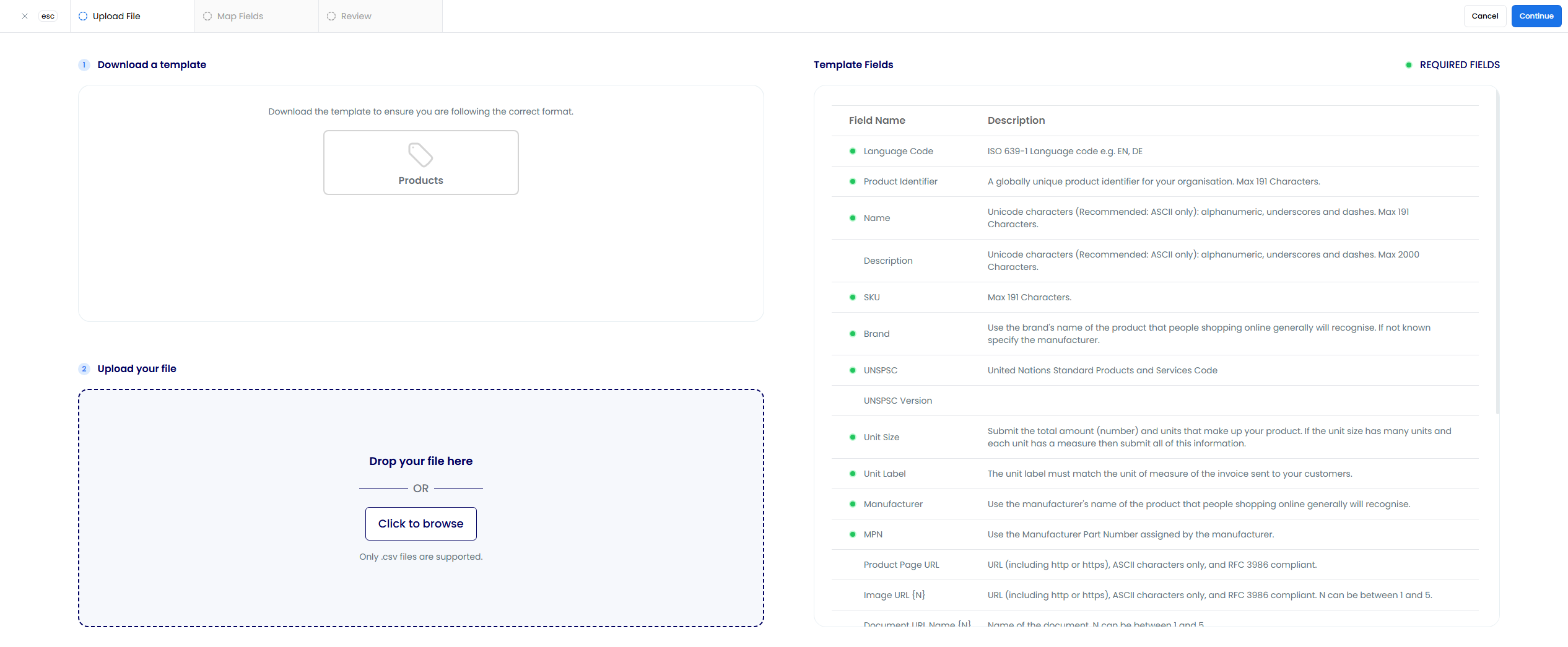
- To download a template that includes the fields required by Axiom, select the Products icon. The required fields are highlighted on the right side of the page along with other supported fields. You can also use a file with your own field names and map them to Axiom fields later in the import process
- When your CSV file is ready, drag and drop the file or select Click to Browse to choose it
- To upload, select Continue in the top-right of the page
2Map Fields
In the field mapping step, you select which fields from your CSV match the corresponding Axiom fields. You must map all required Axiom fields before the import can proceed.
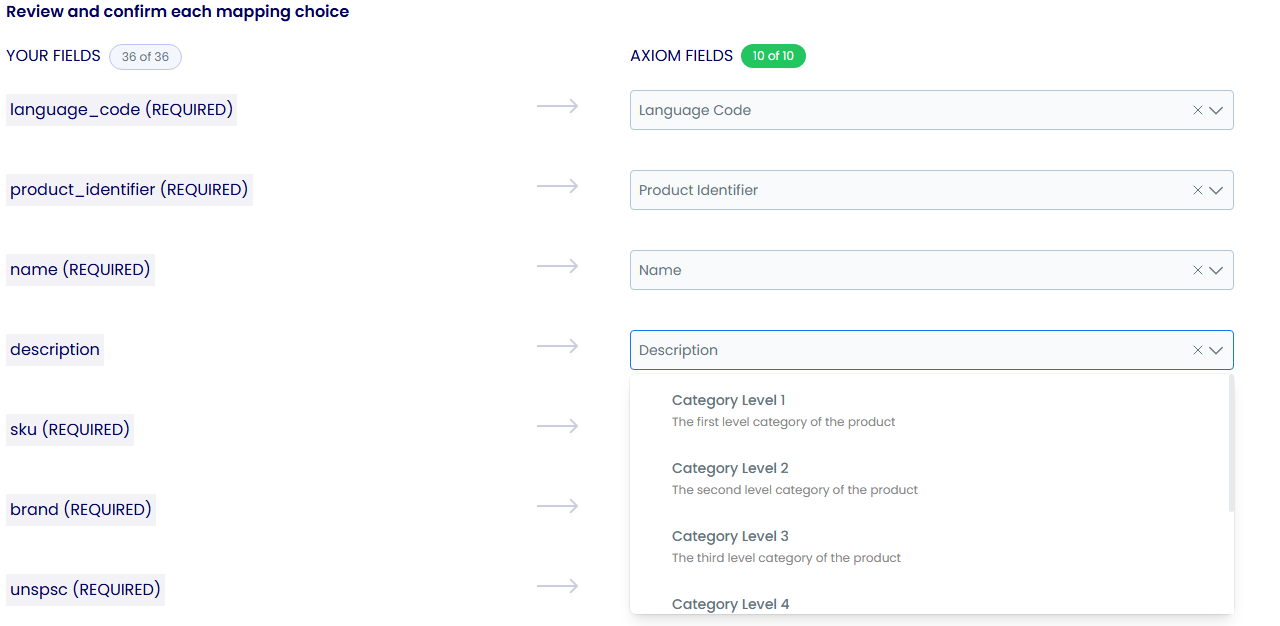
The dropdowns automatically select the appropriate Axiom fields based on your field names. If any mapping is incorrect, adjust it as needed. If you use one of the templates, the fields map correctly by default.
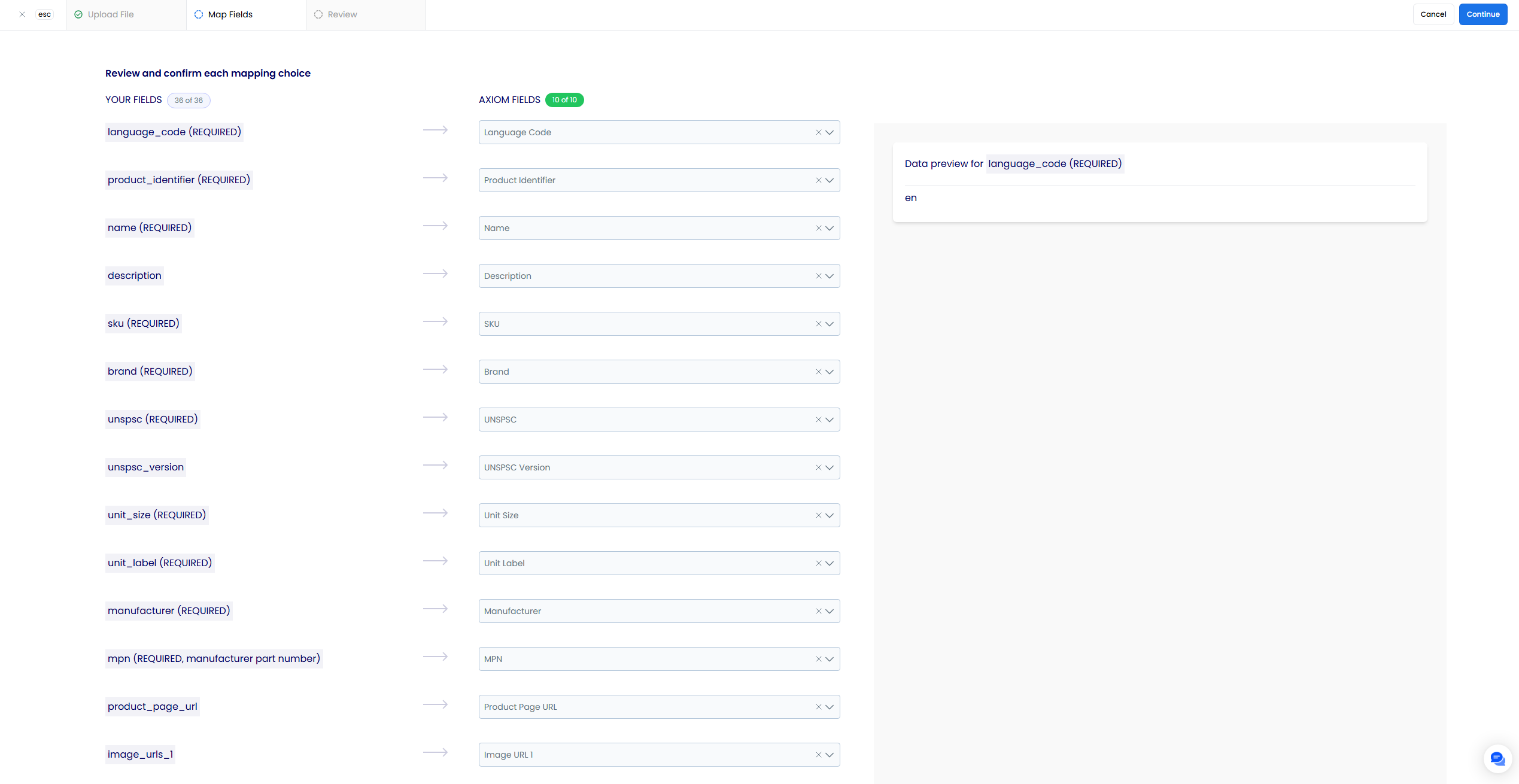
When you work with a field or dropdown, a data preview for that field appears on the right side.
3Preview Data
After you map your desired fields (including all required Axiom fields), select Continue to proceed to the review step. A preview of your data appears in a table.
When you are satisfied, select Continue to begin importing the products from your CSV file.

4Review Import Results
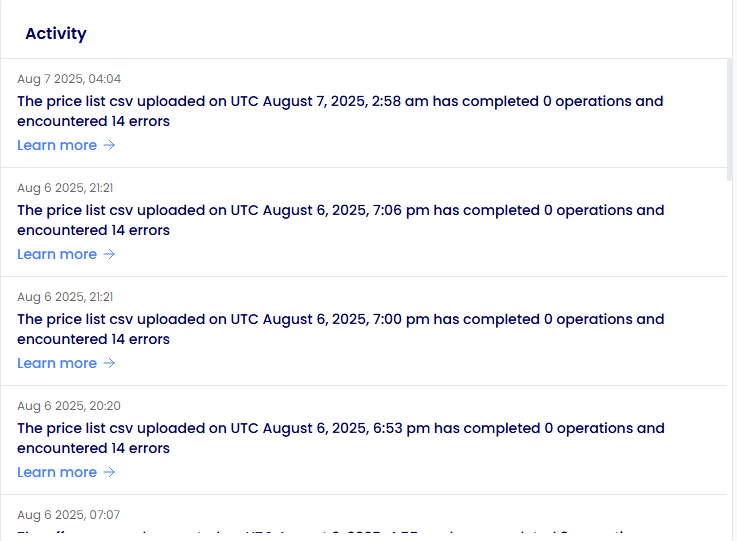
You receive a notification in the platform (under the activity section of the analytics page) and by email when your import completes. The notification lists any errors with your product data, the count of successfully imported products, the number of errors, and a link to the error file. If you need further assistance, forward the error file to support@axiomdata.io.
You can view all past and current imports on the Imports page. To view more detail about an import, select the table row.
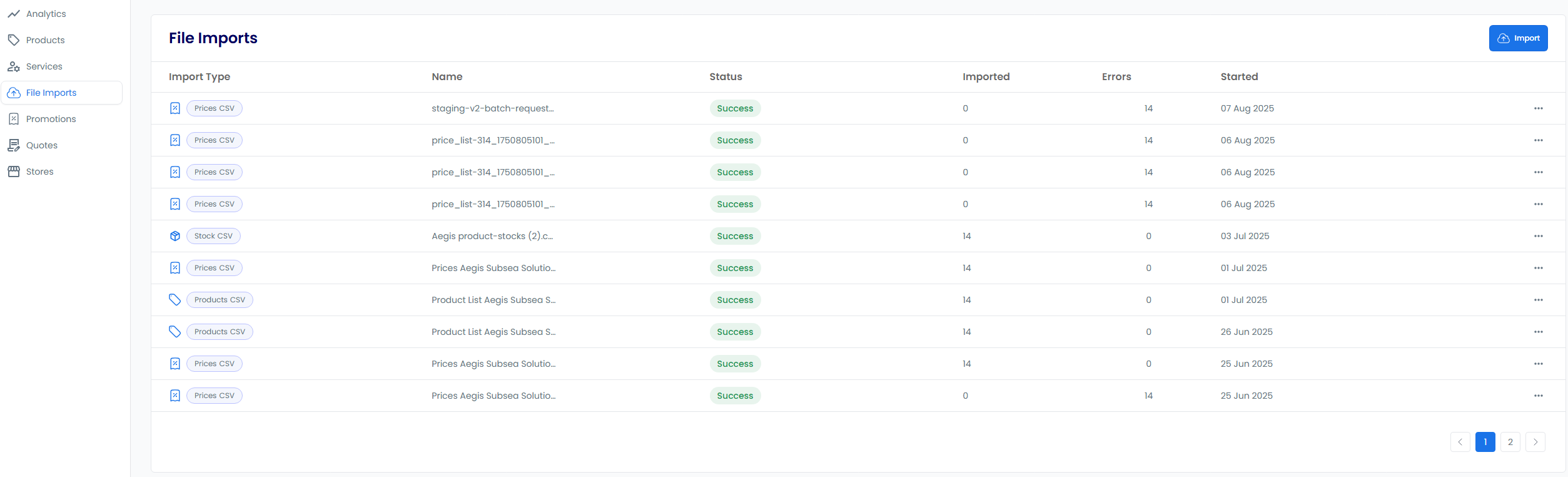
On the import details page, you can view errors in the errors table, including file rows and error messages. To download the original CSV file, select the Download File button under ....
You can also download a copy of your original file with an additional errors column to identify which rows need adjusting. To do this, select the Download Errors button.

Required Fields for a CSV Import
The required fields can be found highlighted in green in the template here.
| Field | Description |
|---|---|
| Language Code | A code used to identify the language that the product information is being provided in, e.g., en for English. |
| Product Identifier | A unique identifier that is used to clearly identify the product being sold. |
| Name | The name field is a string with a recommended limit of 1-150 characters, and it can contain Unicode characters (recommended: ASCII only). |
| SKU | Abbrev. for Stock Keeping Unit. This is used to uniquely identify each product and variant. The SKU will be shown to customers who view your products online. |
| Brand | Use the brand attribute to indicate the product's brand name. The brand is used to help identify your product and will be shown to customers. |
| Manufacturer | Use the manufacturer attribute to indicate the product's manufacturer name. The manufacturer is used to help identify your product and will be shown to customers. |
| Unit Size | Use the unit size field to define the measure and dimension of your product. This value provides users with the exact unit size your product is sold in. See the full list of supported units here. |
| Unit Label | Use the unit label field to define the unit of measure which appears on the invoice which is sent to the customer. |
| MPN | Use the MPN code type to submit your product's Manufacturer Part Number (MPN). MPNs are used to uniquely identify a specific product among all products from the same manufacturer. Shoppers might search specifically for an MPN, so providing the MPN can help ensure that your product is shown in relevant situations. |
| UNSPSC | United Nations Standard Products and Services Code (UNSPSC) codes are used to classify products and services: in the case of suppliers, to classify the products and services of their company, and in the case of UN staff members, to classify the products and services when publishing procurement opportunities. |
Optional Fields for a CSV Import
Examples of further optional fields and their requirements can be found in the table below.
| Field | Description |
|---|---|
| Description | Use the description field to tell customers about your product. List product features, technical specifications, and visual attributes. A detailed description will help us show your product to the right customers. |
| Image URL | The URL for product images. This image appears to potential buyers. Images are displayed to users in order equal to their position in the array. e.g., the first image URL in the images array will be used as the first image of the product in search results and the product page. |
| Properties | Use the properties field to clearly identify the properties of the product that you are selling. Properties are one of the most important parts of your product listing. Your properties and property values will be displayed to the buyer on the product page and will be used to filter and search for products. Property names can be up to 155 characters in length. However, users will typically only see the first 30 characters or so of the property name. Property values have no limits on length. |
Deleting and Archiving Products
You can delete or archive products by importing a CSV file.
- Navigate to the Products page or the File Imports page in the Products area
- Select Delete, then select Products CSV file
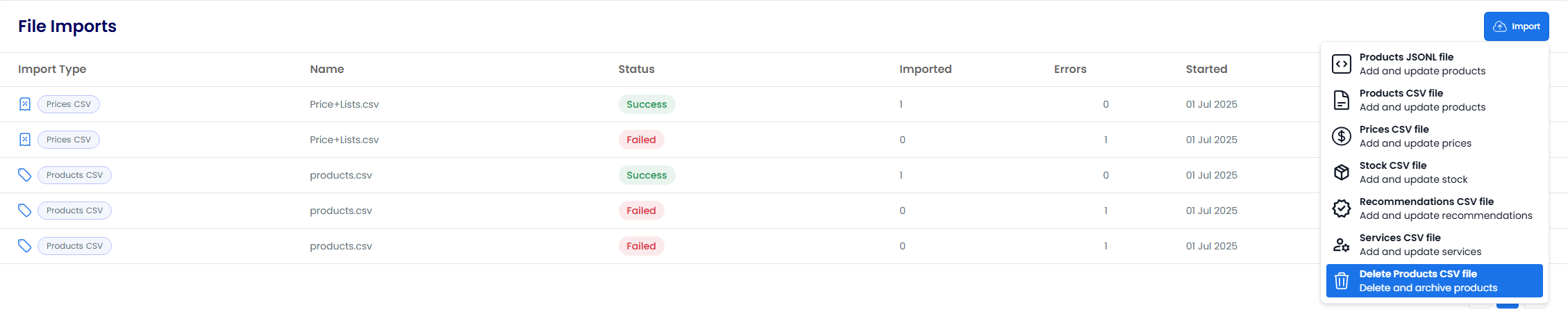
- Download the CSV template. It includes the two columns required by Axiom for deleting or archiving:
commandandproduct_identifier. You do not need to populate the remaining fields - When your CSV file is ready, drag and drop the file or select Click to Browse to choose it
- To begin importing the deletion or archive commands from your CSV file, select Continue
Uploading JSONL Files
1Upload a File
- Navigate to the Products page or the File Imports page in the Products area
- Select Import, then select Products JSONL file
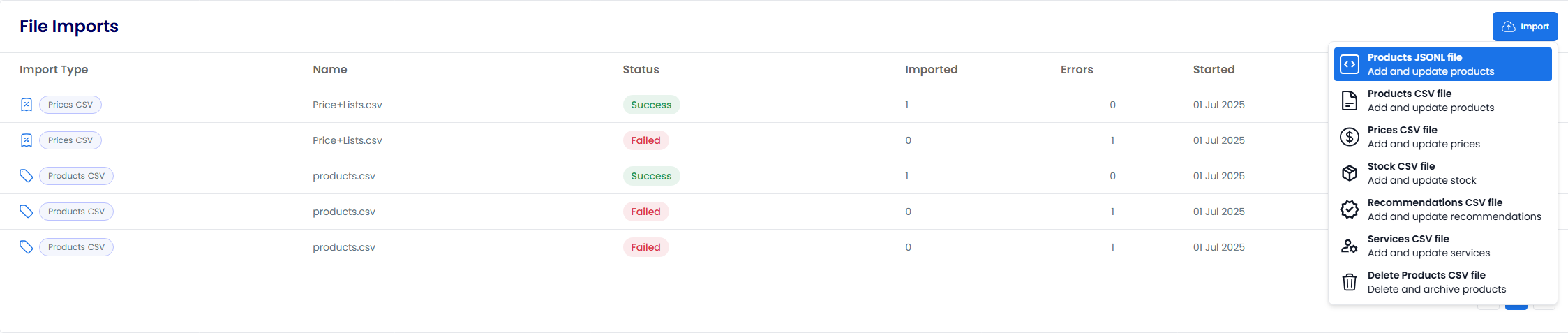
- Download the JSONL template if needed. It includes the fields required by Axiom
- When your JSONL file is ready, drag and drop the file or select Click to Browse to choose it
- To begin the import, select Continue
2Review Import Results
You receive a notification when your import completes. The notification lists any errors with your product data.
You can view all past and current imports on the Imports page. To view more detail about an import, select the table row.
On the import details page, you can view errors in the errors table, including file rows and error messages. To download the original JSON file, select the Download File button under ....
You can also download a copy of your original file with an additional errors column to identify which rows need adjusting. To do this, select the Download Errors button.
Import File Format Guide
This video explains the various file formats supported for product imports and how to prepare your data files correctly.
Product Import Process
This video walks through the complete process of importing product data files, including handling validation errors and reviewing import results.
Viewing Full Import History
This video shows suppliers how to access and review the complete history of their imported files in Axiom.
- Overview
- CSV Files
- JSON Lines (JSONL) Files
- Creating Products with a File
- Uploading CSV Files
- 1. Upload a File
- 2. Map Fields
- 3. Preview Data
- 4. Review Import Results
- Required Fields for a CSV Import
- Optional Fields for a CSV Import
- Deleting and Archiving Products
- Uploading JSONL Files
- 1. Upload a File
- 2. Review Import Results
- Import File Format Guide
- Product Import Process
- Viewing Full Import History