Create Discount Programs
Learn how to configure discount types, conditions, and pricing models for your promotions.
promotion-listView the list of promotions.promotion-createCreate promotions and discount programs.
Overview
Suppliers create promotions for stores to offer time-limited or ongoing discounts on product prices. Each promotion applies a specific discount type and can target products based on configurable conditions.
For step-by-step instructions on creating and managing promotions in the platform, see Creating Sales Promos.
Understanding Promotion Types
Choose one of the following discount types when you create a promotion:
- Fixed Price — Set a specific sale price for the product (for example,
$51.50). - Percentage Off — Subtract a percentage from the price (for example,
20%off). - Percentage Off Cart — Apply a percentage discount off the total cart value (for example,
15%off). - Amount Off — Subtract a fixed amount from the price (for example,
$100off).
Configuring Promotion Conditions
Define one or more conditions to control which products a promotion applies to. A product must meet all defined conditions for the promotion to take effect.
- Products — Include specific products by their product identifiers.
- Categories — Include all products within selected categories.
- Brands — Include all products that match selected brands.
- Manufacturers — Include all products that match selected manufacturers.
- Countries — Include all products sold in selected countries.
- Currencies — Include all products priced in selected currencies.
- Basket — Include baskets based on a total price condition: greater than or less than a set amount.
- Item — Include specific products based on a price condition: greater than or less than a set amount.
Understanding Promotion Resolution
The system calculates final prices using the following logic:
- Fetch the base price for the product based on the buyer's quantity, country, and currency.
- Apply any fixed_price promotions first. These override the base price.
- If no fixed_price promotions exist, apply percentage_off promotions first, then amount_off promotions.
- percentage_off promotions reduce the running price by a percentage, applied sequentially.
- amount_off promotions reduce the running price by a fixed amount, applied sequentially.
- Set the running price to 0 if it drops below zero after all promotions.
- Return both the base price and the final price.
Tip
The order of application and the type of promotion (percentage off or amount off) can affect the final price.
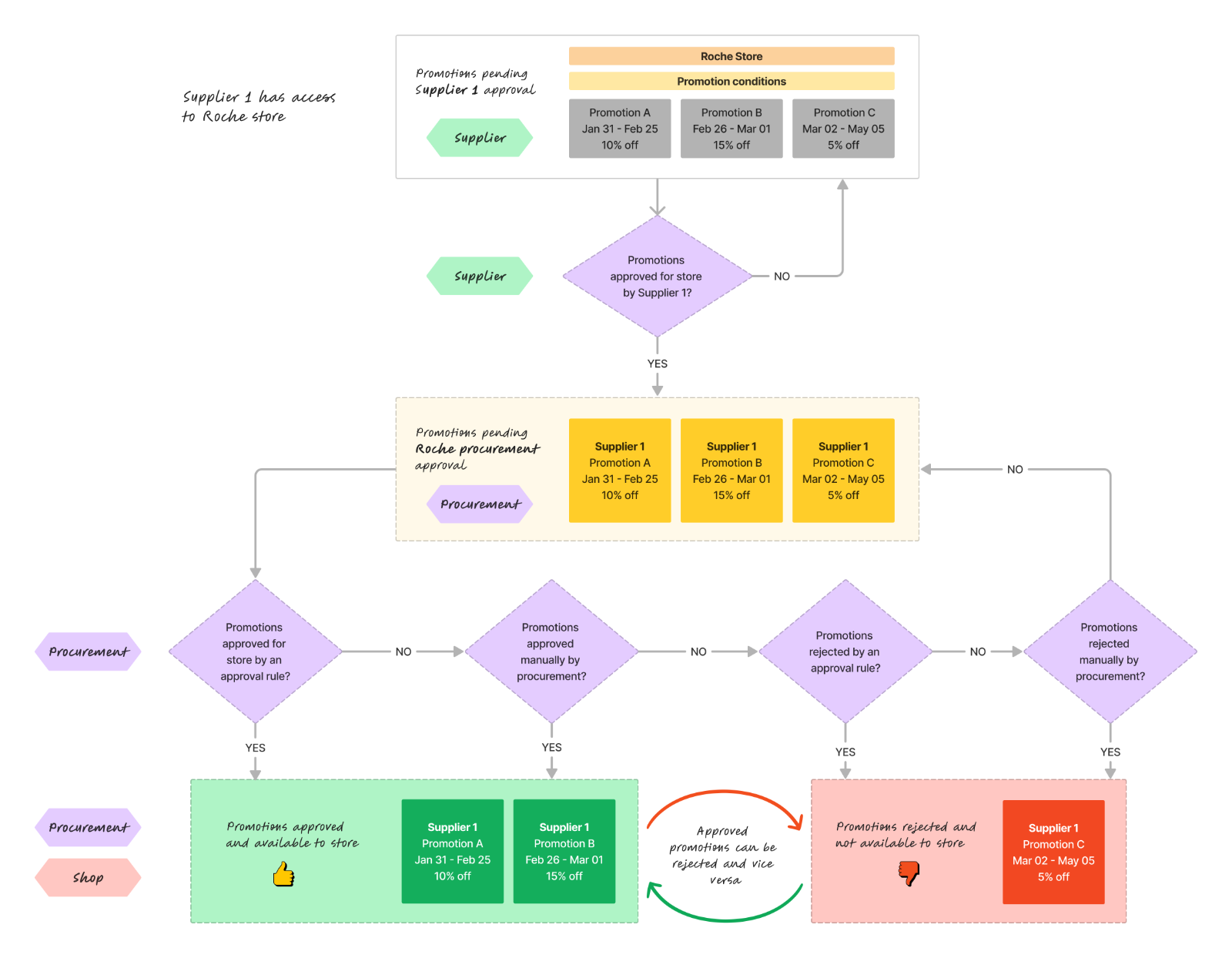
Reviewing Promotion Approvals
In B2B relationships, all price changes require auditability and approval from procurement, including promotions.
Setting Up Complex Pricing Models
Use volume or graduated pricing models for tiered discount structures.
- Select a currency for the pricing model
- Populate the pricing table with tier details
- Add new tiers by selecting + Add another tier. Remove tiers with the trash icon.
Volume Pricing
For each tier in a volume pricing model:
- Last unit — The inclusive cutoff quantity for the tier.
- Per unit — The price per unit for all units if the total quantity falls within the tier.
- Flat amount — An optional additional charge for the tier.
Graduated Pricing
For each tier in a graduated pricing model:
- Last unit — The inclusive cutoff quantity for the tier.
- Per unit — The price per unit for only the units within the tier.
- Flat amount — An optional additional charge for the tier.
Promotion Fields Reference
Use the following fields when you create a promotion through the UI or API:
| Field | Required | Description |
|---|---|---|
| Name | Yes | A unique, descriptive name for the promotion. |
| Description | No | A brief description for reference. |
| Promotional Message | No | A message displayed to the buyer. |
| Promotion URL | No | A link to more information about the promotion. |
| Start Date | No | The date the promotion becomes active. Defaults to the creation date. |
| End Date | No | The date the promotion expires. Leave blank for an indefinite promotion. |
| Conditions | No | One or more conditions to target specific products. |
| Actions | Yes | The discount action to apply (for example, 10% off). |
Creating a Promotion with the API
Find the Store ID
Provide the store ID in the request URL. To find the store ID, search for the store on the Stores page.
https://api.axiomdata.io/api/suppliers/promotions/stores/{store}
This endpoint creates a new promotion for a `store`.
Examples
Amount off promotion
Create a promotion for store ID 1 with a $10 discount for all products in category ID 2.
curl --location --request POST 'https://api.axiomdata.io/api/suppliers/promotions/stores/1' \
--data-raw '{
    "name": "Promotion Name",
    "description": "A description of the promotion",
    "promotion_message": "Check out this promotion",
    "promotion_url": "http:\/\/www.example.info",
    "conditions": [
        {
            "categories": {
                "type": "include",
                "ids": [
                    2
                ]
            }
        }
    ],
    "actions": {
        "amount_off": [
            {
                "currency": "USD",
                "unit_amount": 10,
                "billing_scheme": "standard"
            }
        ]
    }
}'
Percentage off promotion
Create a promotion for store ID 1 with a 10% discount for product identifiers product1, product2, and product3.
curl --location --request POST 'https://api.axiomdata.io/api/suppliers/promotions/stores/1' \
--data-raw '{
    "name": "Promotion Name",
    "description": "A description of the promotion",
    "promotion_message": "Check out this promotion",
    "promotion_url": "http:\/\/www.example.info",
    "conditions": [
        {
            "products": {
                "type": "include",
                "ids": [
                    "product1",
                    "product2",
                    "product3"
                ]
            }
        }
    ],
    "actions": {
        "percentage_off": [
            {
                "percentage": "20",
                "billing_scheme": "standard"
            }
        ]
    }
}'
Fixed price promotion
Create a promotion for store ID 1 with a fixed price of $50 for variant identifier variant1.
curl --location --request POST 'https://api.axiomdata.io/api/suppliers/promotions/stores/1' \
--data-raw '{
    "name": "Promotion Name",
    "description": "A description of the promotion",
    "promotion_message": "Check out this promotion",
    "promotion_url": "http:\/\/www.example.info",
    "conditions": [
        {
            "products": {
                "type": "include",
                "ids": [
                    "variant1"
                ]
            }
        }
    ],
    "actions": {
        "fixed_price": [
            {
                "currency": "USD",
                "unit_amount": 10,
                "billing_scheme": "standard"
            }
        ]
    }
}'
Graduated amount off promotion
Create a promotion for store ID 1 with a graduated discount for all products with the brand Example.
curl --location --request POST 'https://api.axiomdata.io/api/suppliers/promotions/stores/1' \
--data-raw '{
    "name": "Promotion Name",
    "description": "A description of the promotion",
    "promotion_message": "Check out this promotion",
    "promotion_url": "http:\/\/www.example.info",
    "conditions": [
        {
            "brands": {
                "type": "include",
                "names": [
                    "Example"
                ]
            }
        }
    ],
    "actions": {
        "amount_off": [
            {
                "currency": "GBP",
                "billing_scheme": "graduated",
                "tiers": [
                    {
                        "up_to": 10,
                        "flat_amount": "5",
                        "unit_amount": "10"
                    },
                    {
                        "up_to": 100,
                        "flat_amount": "5",
                        "unit_amount": "20"
                    },
                    {
                        "up_to": 1000000000,
                        "flat_amount": "5",
                        "unit_amount": "25"
                    }
                ]
            }
        ]
    }
}'
- Overview
- Understanding Promotion Types
- Configuring Promotion Conditions
- Understanding Promotion Resolution
- Reviewing Promotion Approvals
- Setting Up Complex Pricing Models
- Volume Pricing
- Graduated Pricing
- Promotion Fields Reference
- Creating a Promotion with the API
- Find the Store ID
- Examples
- Amount off promotion
- Percentage off promotion
- Fixed price promotion
- Graduated amount off promotion